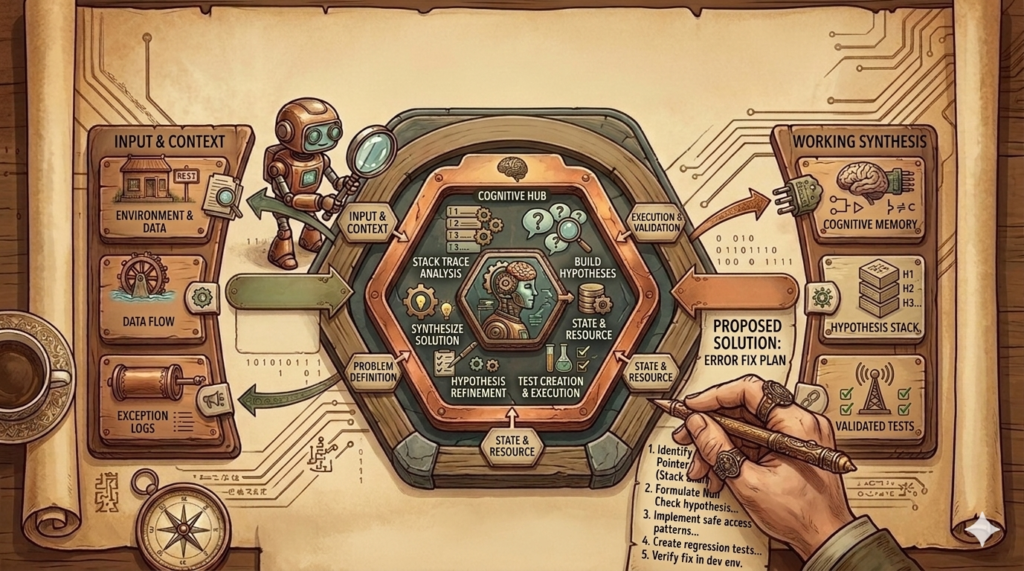
Even in the age of AI coding bugs inevitably happen. Some say AI is causing more bugs than we had before. Anyway, also for debugging we can receive some help from AI. That is why I created an Agent Skill for debugging.
The Debug Agent Skill
Our debug skill should take a stack trace or error description as input. Based on that and the project at hand, it should form hypotheses and create tests to reproduce the issue in the code. Skills are an independent, shareable and modular way to customise coding assistants. They are meant for repeatable tasks and they are not only instructions but can also involve more context and scripts.
Today we create a skill in a full stack project that consists of a Java Spring Boot backend and a Angular frontend. The two are connected through an API. We create a debug folder in our skills folder and also place the skill file in there:
skills/debug/SKILL.md
How does the skill file look like?
---
name: debug
description: Analyze pasted stack traces from any environment, form 2-3 concrete hypotheses, visualize likely failure paths, and reproduce the bug with a failing test before fixing code.
---

# Skill: Debug from Stack Trace

## Purpose

Use this skill when a user pastes a stack trace, error log, or production failure excerpt and wants help debugging the issue in this repository.

This skill is optimized for cases where:

- the failure happened in another environment
- only logs or stack traces are available
- the root cause is uncertain
- the bug should be reproduced with a test before changing code

## Core workflow

Follow this sequence strictly:

**Hard stop rule:** if there is no clear stack trace, no concrete error, or the failure mode is still ambiguous, the very first response must stay in diagnosis mode. That means: summarize what is known, state what is unknown, present 2-3 ranked hypotheses, and ask how to continue or what additional evidence is available. Do not edit code, do not write tests, and do not propose a fix until the uncertainty has been reduced enough to justify a reproduction path.

1. **Parse the stack trace**
   - Extract the exception type, message, top application frames, and repeated patterns.
   - Distinguish framework noise from application frames.
   - Identify the most relevant user-code entry points first.
   - If there is no stack trace, then do not guess blindly. Instead, state what is known vs unknown and what minimal additional evidence would reduce uncertainty.
   - If there is a vague symptom but no clear failure signal, do the same: remain in diagnosis mode first.
   - Build some hypotheses as described in step 2 (without the stack trace evidence if needed), clearly label them as speculative, and ask how to continue before doing anything else.
   - You also do not need to run tests if there is no clear evidence that the bug is in the application code. In that case, give bounded debugging guidance or ask for more information.

2. **Build 2-3 hypotheses**
   - Produce 2 or 3 plausible causes only.
   - This step is mandatory before any implementation work whenever the issue is not already clear from evidence.
   - For each hypothesis include:
     - why it matches the trace
     - which files/classes likely participate
     - what evidence would confirm or disprove it
   - Rank them from most likely to least likely.

3. **Show a diagram**
   - Render a Mermaid flowchart of the likely failing path.
   - The diagram should show:
     - triggering API/use case entry point
     - intermediate collaborators
     - the suspected failing branch or null/missing state
     - the thrown exception
  - The file needs to be created in the root of the project such that I can view it.

4. **Choose the smallest reproduction test**
   - Prefer the narrowest test that can reproduce the bug reliably.
   - In this project, use:
     - **JUnit 5 + Mockito** for application/use-case bugs
     - **`@WebMvcTest`** for controller/API behavior bugs
     - **integration-style test only when necessary** for cross-layer behavior that cannot be reproduced in isolation
   - Avoid `@SpringBootTest` unless there is no smaller realistic reproduction.

5. **Write the test first**
   - Add or update a test that reproduces the suspected issue.
   - The test must fail first.
   - State clearly why that failing test reproduces the bug.

6. **Only then fix the code**
   - After the failure is confirmed, implement the smallest safe fix.
   - Preserve architecture boundaries:
     - `api` → `application` → `domain` ← `infrastructure`
   - Do not introduce framework code into domain classes.

7. **Verify after the fix**
   - Re-run the reproduction test.
   - Re-run related tests if needed.
   - Summarize root cause, fix, and why the test now passes.

## Output format

When using this skill, structure the response like this:

If the issue is unclear or there is no clear stack trace, stop after sections 1 and 2 first, then ask for confirmation or more evidence before moving on.

### 1. Observations
- exception type
- important message
- most relevant application frames

### 2. Hypotheses
- Hypothesis 1
- Hypothesis 2
- Hypothesis 3 (optional)

### 3. Failure diagram
- Mermaid flowchart showing the likely failing path

### 4. Reproduction plan
- whether to use a unit, MVC, or integration test
- what exact scenario should fail first

### 5. Fix plan
- smallest likely code change after the test fails

## Hypothesis guidelines

Good hypotheses are:

- specific
- tied to concrete classes or methods
- falsifiable
- based on evidence from the trace

Avoid vague guesses like:

- "something is null somewhere"
- "configuration issue maybe"

Prefer concrete statements like:

- "`GetRaceUseCase.execute()` likely dereferences a missing repository result because the trace ends at `Optional.get()` and the API path is `GET /races/{id}`."

## Diagram template

Use a Mermaid flowchart similar to this:

```mermaid
flowchart TD
    A[HTTP request enters controller] --> B[Controller calls use case]
    B --> C[Use case queries repository]
    C --> D{Expected entity present?}
    D -- No --> E[Missing state / null / empty Optional]
    E --> F[Exception thrown]
    D -- Yes --> G[Normal response]
```

Adjust node labels to the concrete stack trace and code path.

## Test selection guidelines

### Use a unit test when

- the failure is inside a use case
- collaborators can be mocked
- the bug is a null, missing `Optional`, mapping error, or branch error

### Use a controller test when

- the failure depends on HTTP request handling
- status codes, JSON bodies, path variables, or request binding matter

### Use an integration test when

- multiple layers must collaborate to trigger the bug
- persistence or serialization is essential to reproduce it

## Project-specific rules

For this repository:

- application tests should use **JUnit 5 + Mockito**
- controller tests should use **`@WebMvcTest`**
- avoid `@SpringBootTest` for ordinary debugging work
- use domain repository interfaces as mocks, not JPA repositories
- keep use cases single-purpose with one public `execute(...)` method

## If the stack trace is incomplete

If the user provides only a partial trace, still proceed:

- identify the best visible application frame
- state what is known vs unknown
- give 2-3 bounded hypotheses
- suggest the minimal additional evidence that would reduce uncertainty

## Recommended default behavior

For this project, prefer the following order:

1. analyze pasted stack trace or available evidence
2. if the issue is unclear, stop and produce 2-3 hypotheses first
3. only after the failure path is credible, show Mermaid diagram
4. write failing reproduction test
5. fix code
6. verify the test passes

Do not skip the failing-test step unless the user explicitly asks to.
Do not skip the hypotheses-first step when the evidence is weak or ambiguous.
Let us see next, how we can use that skill.
Applying the Debug Skill on Different Problems
Easy Bug with Stack Trace
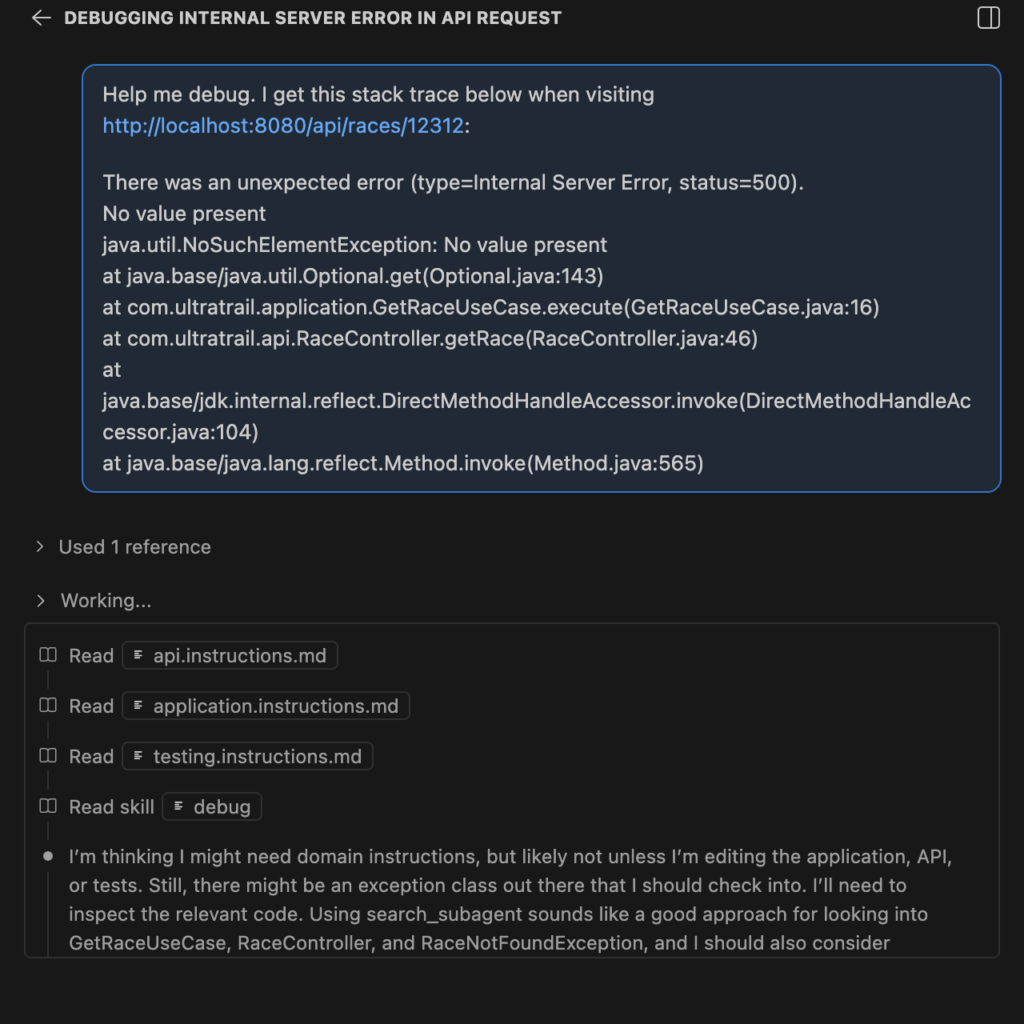
I’ve added a “java.util.NoSuchElementException: No value present” issue deliberately into our code. And triggered that issue. The resulting stack trace contains the following
There was an unexpected error (type=Internal Server Error, status=500).
No value present
java.util.NoSuchElementException: No value present
	at java.base/java.util.Optional.get(Optional.java:143)
	at com.ultratrail.application.GetRaceUseCase.execute(GetRaceUseCase.java:16)
	at com.ultratrail.api.RaceController.getRace(RaceController.java:46)
	at java.base/jdk.internal.reflect.DirectMethodHandleAccessor.invoke(DirectMethodHandleAccessor.java:104)
	at java.base/java.lang.reflect.Method.invoke(Method.java:565)
We can now chat to Copilot and we see below that a skill was read and that skill is the debug one:
It generated a diagram that describes the issue. I believe this is important to review the issue easily. The diagram explains it in a way such that it only takes a few seconds. That helps to keep the understanding of the system alive and spot additional issues that could appear:
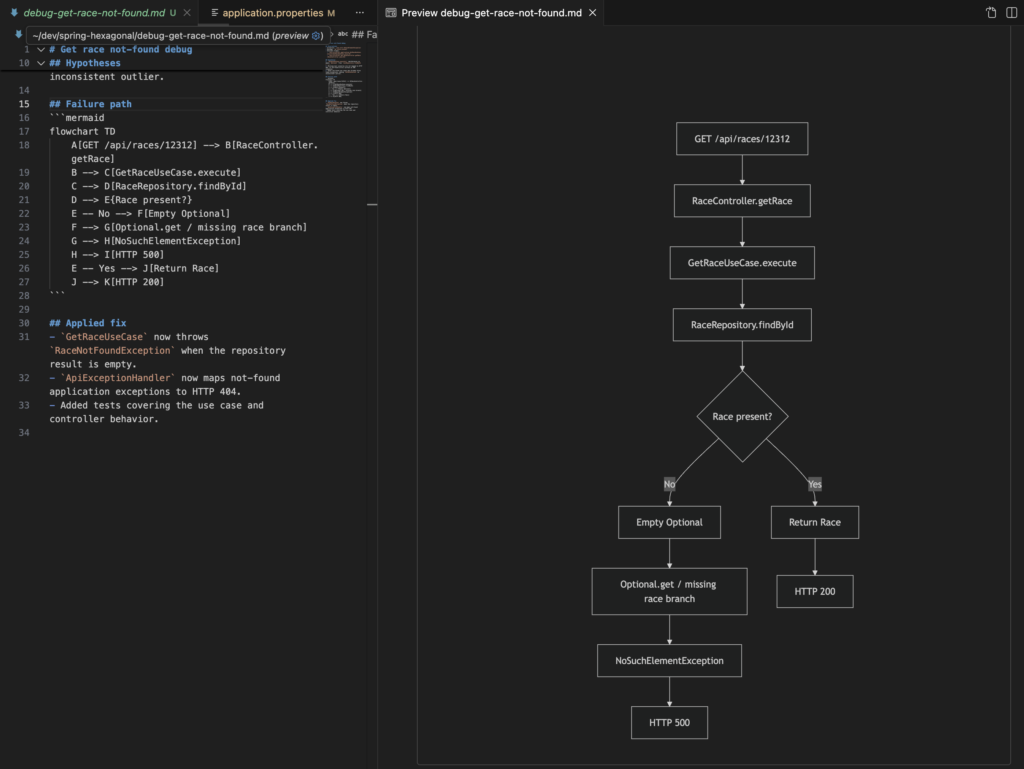
Then it continued by creating a test to reproduce the issue. This helps that the issue does not reappear in the future. It also fixed the issue because it is an easy fix:

Finally the view in our chat shows that the test was failing first. Then the fix (shown above) was applied and the rerun of the test also proved that the problem is fixed:
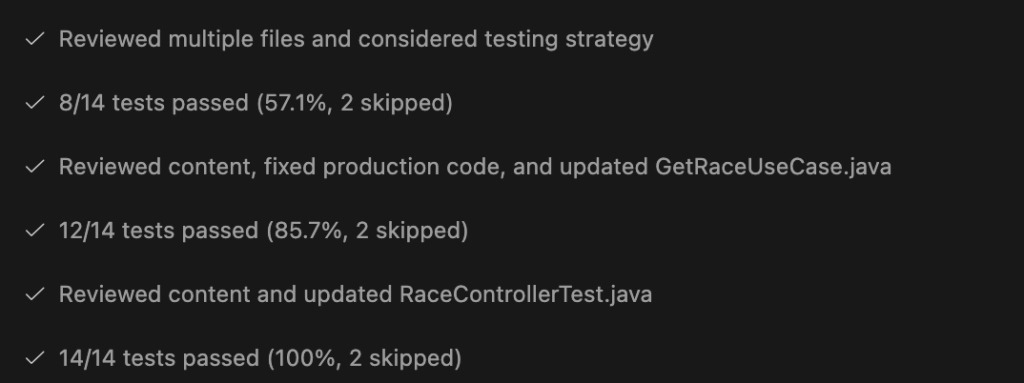
This ensures that we don’t have follow up issues and that the issue was reproduced and (most likely) correctly fixed. If we now would visit http://localhost:8080/api/races/12312 the result is “Race not found with id: 12312”.
Harder Issues where we Need Hypotheses
Now we try something harder that does not even have a stack trace:
Sometimes I have an issue on Production and the database is not responding with the results I would expect. Please help me. It's in the area of races. Sometimes it looks like there is just no connection to the DB.
How will CoPilot handle that?
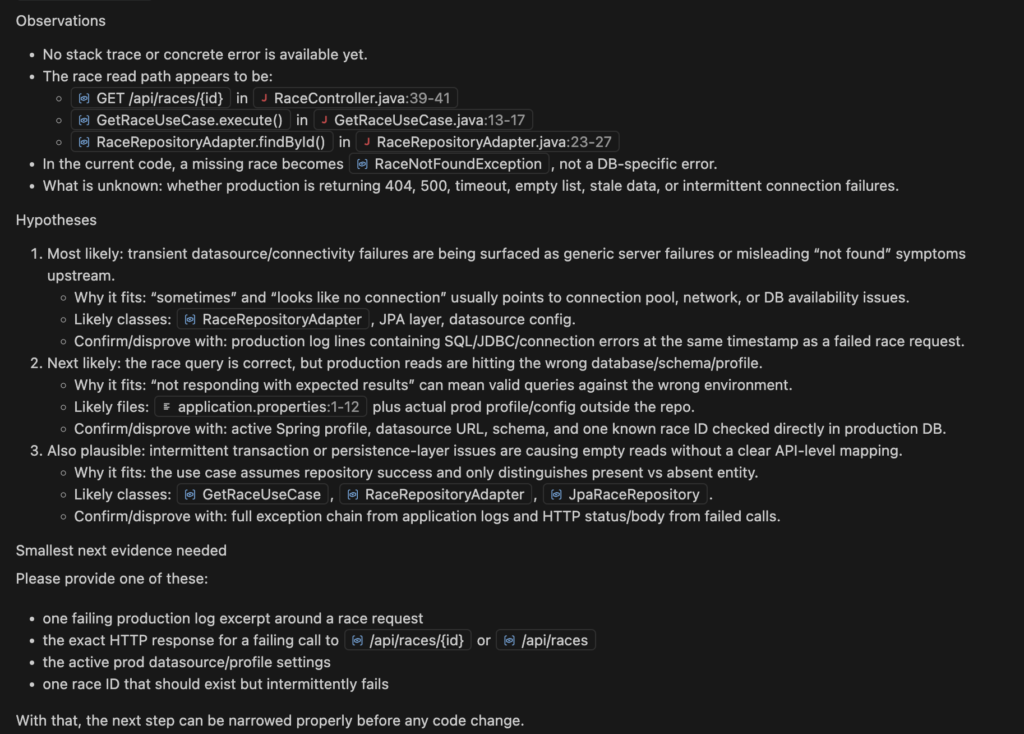
We see that it helped telling in the SKILL.md that there should be no guesses. Thanks to those hypotheses listed we can deliver more evidence first before aimlessly trying to solve an unclear issue.
Consequences of Having a Debug Skill
For me mainly two aspects were important:
- There’s a well defined debug procedure that allows to use AI.
- But on the other hand, AI debugging should be kept inside some boundaries.
We all know that LLMs and coding agents try to always find a solution. I have seen coding agents iterating forever to find an issue. With above solution I wanted to prevent this endless loop of stupidly trying to solve and issue that might not even be in the context of the application. That is why the stopping condition is very important. The hypotheses and the collection of more evidence help to pinpoint the issue.
Developers will use AI to debug. That is guaranteed. I still believe that there should be a general understanding of issues. This helps to steer the agent better for further changes. That is why I also wanted a diagram as output. The diagram should explain the problem such that the develop understands in a few seconds what was happening.