
AI-aided coding is popular. Almost all developers know the feeling when tokens or premium requests run out towards the end of the month. Still lots of devs blindly use their AI agent without much optimisation in mind. We can do better and will see here how to optimise a code base for an AI agent and how much this can save in time and tokens.
Agent Experience is the New Dev Experience
In the previous years code bases were optimised for humans. Good READMEs, nice scripts, a clear structure, verification tests for the code design, etc. Now we have a second actor with AI agents that start to contribute and dominate already in most cases. Agents do not complain much about code bases usually. That means it is on you to optimise it for them. You can still ask an agent what it needs to do its work in an ideal way. Optimising for agent experience will save tokens and time, but it will also improve the quality of your changes and make sure the code base follows a defined structure.
Adding an Entity as a concrete Use Case
In my Java Spring Boot demo project we will add a new entity in an optimised way.
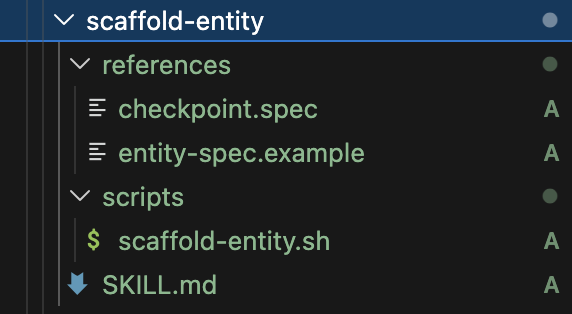
In that skill folder we have got references and a script alongside the SKILL.md file. The details of the skill can be found on GitHub. Notably the skill creates a spec file and then uses that in scaffold-entity.sh. The script generates multiple files for the entity:
| # | Layer          | File                                |
|---|----------------|-------------------------------------|
| 1 | Domain         | `<Entity>.java`                     |
| 2 | Domain         | `<Entity>Repository.java`           |
| 3 | Application    | `Create<Entity>UseCase.java`        |
| 4 | Application    | `Get<Entity>UseCase.java`           |
| 5 | Application    | `GetAll<Plural>UseCase.java`        |
| 6 | Application    | `Delete<Entity>UseCase.java`        |
| 7 | Application    | `Create<Entity>Command.java`        |
| 8 | Application    | `<Entity>NotFoundException.java`    |
| 9 | API            | `<Entity>Controller.java`           |
| 10| Infrastructure | `<Entity>Entity.java`               |
| 11| Infrastructure | `<Entity>RepositoryAdapter.java`    |
| 12| Infrastructure | `Jpa<Entity>Repository.java`        |
| 13| Test           | `Create<Entity>UseCaseTest.java`    |
| 14| Test           | `<Entity>ControllerTest.java`       |
Like that you receive the complete hexagonal structure for an entity with its basic CRUD operations. Some tests are also introduced.
Compared to a prompt-only approach this is cheaper and faster. The potential savings are summarised in the table below:
| Without skill (today) | With skill | |
|---|---|---|
| Agent reads | 5 instruction files + 6-8 reference files (~9,000 input tokens) | SKILL.md only (~500 input tokens) |
| Agent generates | 14 files of boilerplate (~4,000 output tokens) | 1 spec file + 1 shell command (~200 output tokens) |
| Tool call overhead | 14 create_file calls (~2,800 tokens overhead) | 1 create_file + 1 run_in_terminal (~400 tokens) |
| Customization | N/A (interleaved with generation) | 2-3 small edits (~500 output tokens) |
| Total tokens | ~16,000-20,000 | ~1,600-2,000 |
| Token savings | — | ~85-90% |
| Wall-clock time | ~3-5 min (many sequential LLM calls) | ~30-45 sec (one script + small edits) |
| Quality | LLM may deviate from patterns | Script output is deterministic |
You can see that we save 85%-90% in tokens and around the same in time. In addition we make sure that the script creates the same structure every time. A review and a few edits are of course necessary. Let us see in the next section how to further optimise for agent experience.
Further Optimisations for AI Coding Agents to Explore
This is only one way to optimise your coding agent’s behaviour there are many more aspect. Those I list below.
- Keep a project manifest or architecture summary — One concise file that tells the agent where things live, what depends on what, and what the conventions are. Without it, every conversation starts with the agent reading half your codebase just to get oriented.
- Write scoped instruction files per directory or layer — Use
applyTopatterns so the agent only loads the rules that matter for the file it’s editing. No need to feed it the entire rulebook when it’s just touching one corner of the project. - Create prompt files for things you keep asking for — If you’ve explained the same task twice, it should be a
.prompt.mdyou invoke with one line. The agent doesn’t need to rediscover the pattern every time, and you don’t need to re-type the instructions. - Batch independent reads, sequence dependent ones — When the agent needs to understand context, let it read multiple files in parallel rather than one by one. But if step B depends on step A’s result, don’t let it guess — make that dependency explicit in your instructions. This alone can cut exploration time in half.
- Make the agent run tests before it’s done — Add a rule that every change ends with a test run. You’d be surprised how many issues this catches automatically. It’s cheaper to fail fast in the same conversation than to debug a broken build in the next one.
- Be specific in what you ask for — “Add a
getByStatusmethod to the Order repository” costs a fraction of “make orders filterable by status.” The more precise the request, the less the agent needs to explore, guess, and over-engineer. - Use a structured change request template — Three to five lines: what, where, constraints, tests needed. It removes ambiguity completely. The agent stops asking questions and starts working immediately.
- Record gotchas and decisions somewhere the agent can find them — When you hit a tooling quirk or make a design decision that isn’t obvious from the code, write it down in repo memory. Otherwise the agent will rediscover it the hard way every single time, and you’ll pay for that investigation in tokens.
- Designate a golden reference implementation — Pick one well-tested vertical slice and treat it as the canonical example. The agent copies from working code instead of interpreting prose rules, which means fewer deviations and more consistency across the board.
- Add architecture tests and static analysis to the build — ArchUnit, ESLint, Checkstyle — whatever fits your stack. Convention violations become build errors, not suggestions the agent might overlook. The feedback loop is instant and doesn’t depend on anyone reading instructions carefully.
Using a coding agent should not just be done blindly, but always with optimisation techniques in mind. Try out different aspects to optimise your coding agent. The good thing is that you can also ask the agent to optimise itself. Make it a habit to regularly update your project for your agent if needed. Agent experience is the new dev experience!